Motion Computing LE1700 User's Guide Page 26
- Page / 82
- Table of contents
- TROUBLESHOOTING
- BOOKMARKS

- Motion™ LE1700 Tablet PC 1
- User’s Guide 1
- Contents 3
- Getting Started 7
- Overview 8
- Setting up the LE1700 11
- Features 13
- Function button 14
- Front panel buttons 15
- Status lights 16
- Security 16
- Fingerprint reader 17
- Windows Security button 17
- Microphones 18
- Speakers 18
- Ambient light sensor (ALS) 18
- DataGuard 18
- Infrared (IrDA) 19
- USB 2.0 ports 19
- Headphones port 19
- Microphone port 19
- Security slot 20
- VGA port 20
- DVI-D port 20
- Docking port 20
- Ethernet port 20
- SD (Secure Digital) card slot 21
- PC card slot 21
- SIM card slot 21
- Wi-Fi (802.11a/b/g wireless) 22
- Wireless Broadband 22
- Bluetooth wireless 22
- Power adapter 23
- Using your Tablet PC 25
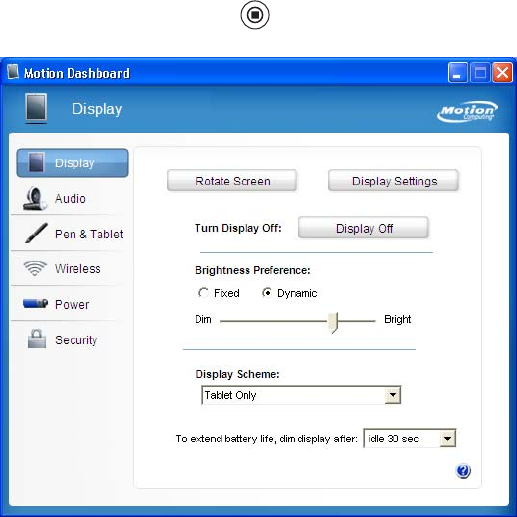
- Using Motion Dashboard 26
- Using the pen 27
- Using Tablet PC Input Panel 28
- Configuring pen options 28
- Function 29
- Directional pad 29
- Using USB 30
- Using Ethernet 30
- Using the display 30
- Rotating the display 31
- Using speech recognition 34
- Using power management 35
- Using Standby 37
- Using Hibernate 37
- Using the battery 38
- Battery maintenance 40
- Disposing of used batteries 41
- Capturing a fingerprint 43
- Using password replacement 45
- Using the password wizard 46
- Using Windows Security Center 49
- Setting a BIOS password 50
- Using Wi-Fi (802.11a/b/g) 52
- Using Wireless Broadband 53
- Using Bluetooth 54
- Using infrared 57
- Finding additional software 57
- Care and Maintenance 59
- Standard display 60
- View Anywhere display 60
- Disinfecting procedures 61
- Cleaning solutions 62
- Replacing pen tips 63
- Ordering new pens 63
- Replacing the antenna 64
- Traveling with your Tablet PC 64
- Restoring data 65
- Creating a backup archive 66
- Creating a bootable disk 66
- Removing the Acronis OEM Zone 67
- Troubleshooting and 69
- Ports and connectors 72
- Frequently asked questions 73
- Specifications 75
- Service and Support 75
- Numerics 77
- 76 Index 82
Related products and manuals for Graphic tablets Motion Computing LE1700
 (72 pages)
© 2020, manymanuals.com. All rights reserved. | 0.031 s |
 Manymanuals.com
 Manymanuals.de
 Manymanuals.fr
 Manymanuals.it
 Manymanuals.pl
 Manymanuals.cz
 Manymanuals.es
 Manymanuals-pt.com
Comments to this Manuals